Android 16 Security Features You Need to Activate Right Now
If you’ve ever had your phone hacked, lost your device to theft, or noticed suspicious logins on your accounts, you’ll understand how unsettling it can be. Google’s new Android 16 update takes this worry seriously.
The latest Android version focuses heavily on security, privacy, and smarter data protection, giving users far more control over their personal information than ever before.
So, if you use an Android phone, here are the new Android 16 security features you should know about, and how they can help keep your phone, data, and identity safer in 2025.
Why Android 16 Security Matters
Smartphone security is no longer just about locking your screen. From mobile banking and online shopping to digital wallets and work emails, our phones now hold everything that defines us.
Unfortunately, that also makes them prime targets for scammers and hackers. In recent years, Android users in Nigeria have faced increasing risks — fake apps that steal bank details, fraudulent job portals asking for personal data, and spyware links hidden in text messages.
Recognising these threats, Google has made Android 16 its most privacy-centred update yet. The new features protect users from both online and physical threats, ensuring every tap, download, or login stays private and secure.
Top Android 16 Security Features
1. Stronger App Permission Controls
One of the biggest upgrades in Android 16 is how it handles app permissions. In previous versions, apps could quietly access your photos, location, or microphone even after you stopped using them — but not anymore.
With Android 16, you can now:
- Grant apps temporary permissions that expire automatically.
- Receive real-time alerts when an app tries to use sensitive data.
- View a privacy dashboard showing which apps accessed your camera, microphone, or contacts.
This gives you complete transparency and control. If an app like TikTok or Instagram uses your location in the background, you’ll know instantly.
2. Enhanced Anti-Theft Protection
Phone theft remains one of the most frustrating experiences for many Nigerians. Android 16 introduces stronger anti-theft protection to secure your data even if your device is stolen.
Key upgrades include:
- Offline tracking — Find My Device now works even if your phone is offline or switched off.
- Auto-lock detection — The system locks your phone automatically if it detects a SIM swap or suspicious movement.
- Remote lock or wipe — Secure your data instantly from any linked Google device.
These features make it nearly impossible for thieves to access your sensitive data.
3. AI-Driven Scam and Fraud Detection
Scammers are getting smarter, and so is Android. Android 16 now uses AI-powered fraud detection to flag suspicious activity in real time.
The system can:
- Identify phishing messages or fake links before you click them.
- Warn you about malicious websites or suspicious callers.
- Learn continuously from global scam patterns for smarter protection.
This proactive defence is a major win for users who bank, shop, or chat online frequently.
4. Safer Passwords and Passkeys
Passwords are becoming outdated. Android 16 now emphasises passkeys, a new, more secure way to log in.
Here’s how it works:
- Passkeys use your fingerprint, face ID, or screen lock instead of text passwords.
- They are stored securely on your device and can’t be phished.
- Google Password Manager syncs them across your devices using end-to-end encryption.
This makes logging into apps, bank accounts, or work platforms faster and far safer.
5. Better Data-Sharing Transparency
Ever wonder how much data apps collect about you? Android 16 now displays clear data-sharing summaries before you install or update any app.
You’ll see exactly what data (contacts, location, usage stats) the app collects — and you can block background sharing if you wish.
This helps users, especially in Nigeria, where mobile lending and shopping apps are common, avoid apps that misuse or overshare personal information.
6. Automatic Security Updates in the Background
Ignoring system updates leaves your phone vulnerable. Android 16 fixes this with automatic security patching that installs silently in the background.
You’ll always have the latest protections without having to click “Update” manually, a must for anyone who uses their phone for business or financial transactions.
7. Private Space for Sensitive Apps
A new feature called Private Space allows you to hide sensitive apps (like banking or work tools) behind an additional authentication layer.
You can access it using your fingerprint or PIN, and the data remains isolated from the rest of your system, perfect for privacy-conscious users.
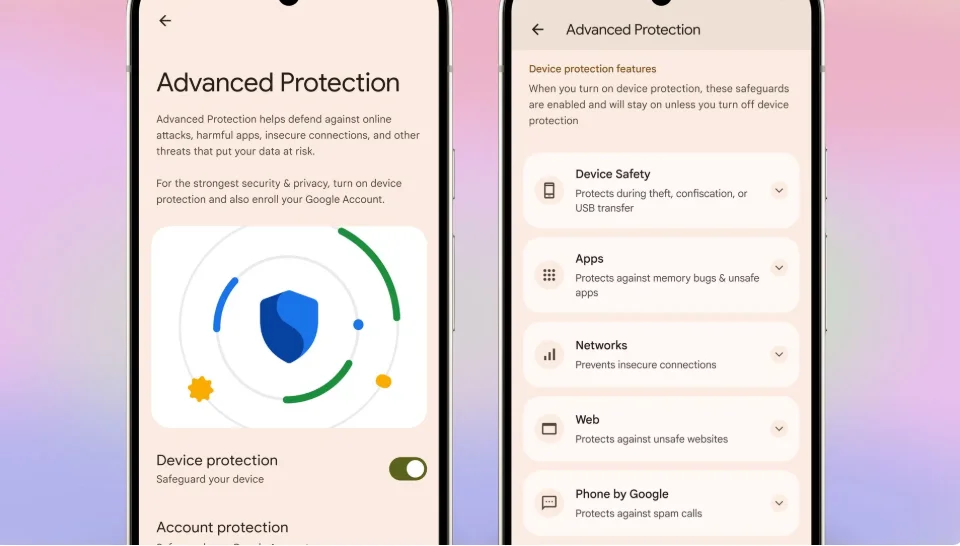
How to Activate These Android 16 Security Features
Once you’ve updated to Android 16, activate the new protections manually:
- Go to Settings → Privacy & Security → Advanced Settings.
- Turn on Private Space, AI Scam Protection, and Automatic Security Updates.
- Review App Permissions regularly to remove unnecessary access.
- Enable Find My Device and link it to your Google account.
Most of these features are active by default, but checking ensures full protection.
Final Thoughts
Android 16 isn’t just faster or smoother, it’s noticeably safer. From stronger privacy controls to AI-based scam detection, Google’s latest update reinforces why keeping your phone updated is essential.
So, when that update notification appears, don’t delay. Install it, explore the new features, and secure your digital life.
And if you know someone still ignoring software updates, share this article. It might just save their data.